Sngine Live Pro Change Log — Version 5.0.3
📞 WebRTC Call System Improvements
- Improved the overall WebRTC voice and video calling system.
- Improved direct P2P WebRTC connections between users.
- Calls now attempt to establish a direct peer-to-peer connection whenever network conditions allow.
- Improved WebRTC signaling and connection negotiation.
- Improved call connection stability and reliability.
- Fixed several reported Messenger voice and video calling issues.
- Improved compatibility across different network environments.
🔄 Automatic SFU Fallback
- Added improved automatic fallback when a direct P2P WebRTC connection cannot be established.
- When a direct connection fails because of NAT, firewall, carrier, or network restrictions, the call is automatically routed through the SFU server.
- Improved switching between direct P2P communication and server-assisted calls.
- No manual action is required from the user when fallback occurs.
- Improved call stability on restricted or unstable networks.
- Reduced failed or disconnected calls caused by WebRTC connectivity problems.
🎙️ Audio Space Improvements
- Fixed reported Audio Space audio problems.
- Improved audio connection handling for speakers and listeners.
- Improved microphone and speaker management.
- Fixed issues where some participants could join an Audio Space but could not hear the audio correctly.
- Improved WebRTC handling inside Audio Spaces.
- Improved connection stability during longer Audio Space sessions.
- Improved speaker/listener state synchronization.
⚡ Server & Connection Improvements
- Improved WebRTC server communication.
- Improved signaling performance.
- Improved SFU connection handling.
- Improved connection recovery when network conditions change.
- Improved stability when users switch between Wi-Fi and mobile networks.
- Reduced unnecessary server usage when a direct P2P connection is available.
- Improved resource handling for active calls and real-time sessions.
🛠 Bug Fixes & Stability
- Fixed multiple reported real-time communication issues.
- Improved voice and video call reliability.
- Fixed several connection and reconnection issues.
- Improved overall server stability.
- General performance improvements and optimizations.
- Various minor bug fixes.
Sngine Live Pro Change Log — Version 4.0.0
July 13, 2026
Live Streaming
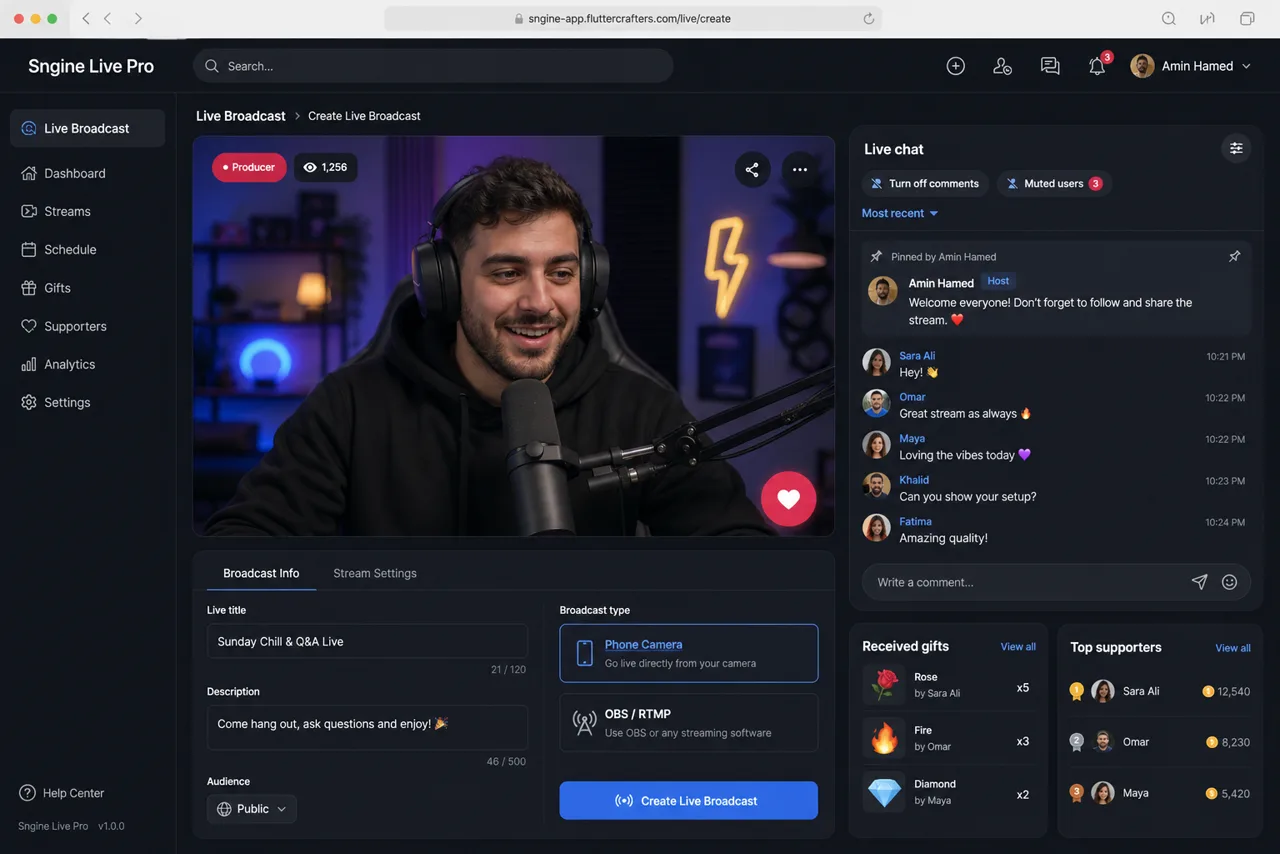
- Redesigned the live-stream creation interface.
- Added mobile camera broadcasting.
- Added OBS and RTMP broadcasting.
- Added low-latency WebRTC support.
- Improved portrait and landscape video layouts.
- Improved viewer and broadcaster pages.
- Added waiting, live, and ended broadcast states.
- Added live title, description, and category settings.
- Added Free, Subscribers Only, and Paid Live access modes.
- Added paid-live pricing.
- Added payment and subscription verification before viewing.
- Added restricted-access messages for unauthorized viewers.
- Added live viewer counters.
- Improved host profile, name, status, follow, share, gift, and reaction controls.
Audio Spaces
- Added a separate broadcast type called
audio_space.
- Created a dedicated Audio Spaces experience separate from video live streaming.
- Added audio-only rooms without camera access.
- Camera permission is not requested for Audio Spaces.
- Microphone permission is requested only for the host and approved speakers.
- Added Host, Co-host, Speaker, and Listener roles.
- Added Request to Speak.
- Added accept and reject controls for speaking requests.
- Added the ability to promote a listener to Speaker.
- Added speaker mute controls.
- Added speaker removal controls.
- Added the ability to return a speaker to Listener.
- Added host controls to end the room.
- Added participant names and profile photos.
- Added an organized speaker layout around the host.
- Added active-speaker indicators.
- Improved speaker audio publishing and receiving.
- Added real-time participant and role synchronization.
- Added support for Free, Subscribers Only, and Paid Audio Spaces.
- Added dashboard configuration for Audio Spaces creation.
- Added support for maximum speaker and listener limits.
- Prepared support for accounts, Pages, and Groups creating Audio Spaces.
Multi-Participant Broadcasting
- Added support for multiple participants in the same broadcast.
- Improved guest join and leave handling.
- Added guest approval and rejection.
- Added guest mute and removal controls.
- Added organized participant layouts.
- Added synchronized participant roles for all viewers.
- Fixed join requests not reaching the other host.
- Fixed accepted speakers not being audible to the host.
- Fixed speaker publishing and receiving issues.
PK Battle
- Added PK Battle support for live broadcasts.
- Added solo and 1v1 battles.
- Added 2v2 team battles for four participants.
- Added automatic division into two teams.
- Added A1, A2, B1, and B2 player labels.
- Added host-controlled player switching between teams.
- Added host-controlled player reordering.
- Added synchronized team layouts for all participants and viewers.
- Added combined team scores and gift totals.
- Added one progress bar showing the competition between both teams.
- Added individual player scores.
- Added individual gift counters.
- Added highest-contributor and MVP indicators.
- Added real-time score and gift synchronization.
- Added winner display when the round ends.
- Fixed individual scoring being displayed instead of team scoring.
- Fixed incorrect player ordering.
- Fixed PK requests not reaching the other host.
Gifts and Creator Earnings
- Added live gift sending.
- Added wallet-balance validation before sending gifts.
- Added a wallet top-up redirect when the balance is insufficient.
- Added real-time gift animations.
- Added gift and supporter counters.
- Added received and sent gift history.
- Added Creator Earnings.
- Added live earnings summaries.
- Added received gift totals.
- Added sent gift totals.
- Added gift value, commission, and creator earning calculations.
- Added live and Audio Space gift records.
- Improved balance and earning updates after transactions.
Live Chat
- Redesigned the live chat panel.
- Improved user avatars and names.
- Improved message bubbles.
- Improved the comment composer.
- Added comment sending and emoji support.
- Added pinned comments.
- Added comment deletion.
- Added user muting.
- Added user blocking.
- Added blocked-keyword management.
- Added the ability to disable comments.
- Added muted-user lists.
- Added blocked-user lists.
- Added blocked-keyword lists.
- Improved chat scrolling.
- Fixed the emoji and sticker panel being clipped.
- Fixed light-mode chat text visibility.
- Fixed dark-mode chat color issues.
- Added a More menu for comment moderation actions.
- Reduced visual crowding inside the chat panel.
Live Activity Tabs
- Added Chat.
- Added Gifts.
- Added Supporters.
- Added Polls & Q&A.
- Added Fan Club.
- Added VIP & Rewards.
- Added Predictions.
- Added Shop.
- Added counters for supported tabs.
- Added horizontal tab scrolling on narrow screens.
- Improved tab interaction and content loading.
- Fixed tabs not opening their corresponding panels.
- Fixed inconsistent tab ordering.
- Added More menus for secondary controls.
- Improved panel ordering for viewers and broadcasters.
Creator Dashboard
- Added Live Producer.
- Added Creator Center.
- Added Earnings.
- Added live viewer statistics.
- Added revenue statistics.
- Added gift statistics.
- Added Live Tap statistics.
- Added broadcast information.
- Added OBS and RTMP settings.
- Added RTMP URL display.
- Added Stream Key display.
- Added Live URL display.
- Added copy controls.
- Added Stream Key visibility controls.
- Added Open Live.
- Added Copy Link.
- Added End Live.
- Added existing-live restoration.
- Improved the live creation form.
- Improved web and mobile responsiveness.
- Added light-mode and dark-mode support.
- Added server-controlled Live Pro colors.
- Added Live Pro translation management through the admin panel.
Live Events
- Added the Live Events foundation.
- Added scheduled broadcast support.
- Added reminder support.
- Added event-to-live conversion support.
- Added upcoming-event display within Live Pro.
Fan Club and VIP
- Added the Fan Club foundation.
- Added fan membership support.
- Prepared membership levels.
- Prepared fan badges.
- Prepared viewing streaks and tasks.
- Prepared special-entry support.
- Added VIP & Rewards.
- Added channel points and broadcast rewards.
Polls, Q&A, and Predictions
- Added Polls and Q&A inside the live panel.
- Added question and option creation.
- Added poll duration settings.
- Added result display.
- Prepared live question interaction.
- Added Predictions.
- Added Channel Points.
- Added prediction questions and multiple options.
- Added prediction duration.
- Added real-time result updates.
- Added dashboard controls for predictions.
Shop, Raids, and Clips
- Added the Shop tab inside live broadcasts.
- Prepared product pinning during broadcasts.
- Prepared product display for viewers.
- Added the Raids foundation for transferring viewers to another broadcast.
- Added the Clips foundation for creating short clips from live broadcasts and recordings.
- Connected these features to the existing Live Pro architecture.
APIs and Real-Time Communication
- Added live creation APIs.
- Added live-state APIs.
- Added join and leave APIs.
- Added speaker-request APIs.
- Added speaker accept and reject APIs.
- Added mute, remove, and moderation APIs.
- Added gift and supporter APIs.
- Added creator-earning APIs.
- Added PK Battle APIs.
- Added poll and prediction APIs.
- Added WebSocket and socket events for participant states.
- Improved synchronization between hosts, speakers, guests, and viewers.
- Fixed live-state SQL errors.
- Fixed Live Pro API routing.
- Added live connection and error logging.
- Added API-based translations.
- Added support for installation through
install.php.
- Kept Live Pro files separated from the Sngine core.
Live Pro Fixes
- Fixed Audio Space speaking requests not reaching the host.
- Fixed approved speakers not being heard by the host.
- Fixed speaker microphone publishing and receiving.
- Fixed missing participant names and profile photos.
- Fixed blocked-user lists not appearing.
- Fixed PK requests not reaching the second host.
- Fixed PK participant ordering.
- Fixed PK team score calculations.
- Fixed individual scores appearing instead of team scores.
- Fixed live tabs not responding correctly.
- Fixed missing live activity panels.
- Fixed clipped chat and reaction controls.
- Fixed live chat text and color contrast.
- Fixed delayed live-state updates.
- Fixed gifts and scores not updating immediately.
- Fixed viewer counters not updating correctly.
- Fixed incorrect Audio Space video-live styling.
- Fixed empty spaces inside chat panels.
- Fixed invalid JSON and non-JSON API responses.
- Fixed Live State request errors.
- Fixed broadcast configuration errors.
- Improved layout behavior on small screens.
- Improved live viewer and participant synchronization.
- Improved compatibility between Live Pro, the Flutter app, the web interface, and the live server.
Architecture and Maintenance
- Separated video live streaming from Audio Spaces.
- Separated Live Pro functionality from the Sngine core.
- Kept Live Pro modifications within the dedicated Live Pro, API Add-ons, and live-server systems.
- Added server-controlled feature flags and settings.
- Improved Live Pro portability to other servers.
- Added tests for single live, 1v1 PK, and 2v2 PK layouts.
- Added narrow-screen layout tests.
- Added Dart formatting and static-analysis verification.
- Improved shared live UI components.
- Improved file organization and maintainability for future Live Pro development.
Version 2.0.5
Jul 1, 2026
🚀 Sngine Live Pro API Update
This update introduces a major API upgrade for Sngine Live Pro – Advanced Live Streaming Suite, enabling full integration with Messenger Sngine for real-time voice and video calling.
✅ Messenger Sngine Integration
-
Updated the Sngine Live Pro API to support Messenger Sngine.
-
Added API compatibility for voice and video calls inside Messenger Sngine.
-
Added support for starting calls directly from Messenger Sngine conversations.
-
Added support for joining calls from Messenger Sngine.
-
Added support for ending calls from Messenger Sngine.
-
Added support for inviting more users to the same call.
-
Added support for group calls through Messenger Sngine.
-
Improved communication between Messenger Sngine and Sngine Live Pro.
✅ WebRTC Calling API
-
Added WebRTC-based calling support through the Sngine Live Pro API.
-
Added support for voice call sessions.
-
Added support for video call sessions.
-
Added support for group call sessions.
-
Added API handling for call participants.
-
Added API handling for call status updates.
-
Added API support for active call management.
-
Added improved call session validation.
-
Added improved call connection handling.
✅ No Agora Required
-
Added a WebRTC calling system that works without Agora.
-
Removed the requirement for any third-party calling service for Messenger calls.
-
Calls are now handled through Sngine Live Pro using WebRTC.
-
Improved flexibility for customers who want a self-hosted real-time calling solution.
✅ Performance & Stability Improvements
-
Improved API response speed for real-time call actions.
-
Improved call session stability.
-
Improved participant joining and leaving behavior.
-
Improved API security and validation.
-
Improved error handling for failed or expired call sessions.
-
Improved overall compatibility between Messenger Sngine and Sngine Live Pro.
Important Note
This update is required for customers who want to use voice calls, video calls, and group calls inside Messenger Sngine.
The WebRTC calling system is connected through Sngine Live Pro, so customers must have Sngine Live Pro installed and updated to use the new Messenger calling features.
Change Log — Version 2.0.0
June 16, 2026
New Features
-
Added viewer invitation system for live streams.
-
Added enhanced guest management tools for hosts.
-
Added new live interaction improvements.
-
Added support for the latest Timeline integration features.
Improvements
-
Completely redesigned and optimized the live streaming experience.
-
Improved WebRTC connection stability and performance.
-
Enhanced PK Battle synchronization and responsiveness.
-
Improved host, guest, and viewer interaction workflow.
-
Optimized stream loading and reconnection handling.
-
Enhanced live session management and moderation tools.
-
Improved overall user interface and user experience.
-
Performance optimizations across the live streaming system.
Fixes
-
Fixed reported PK Battle issues.
-
Fixed guest join and leave synchronization problems.
-
Fixed audio and video synchronization issues.
-
Fixed live stream state update inconsistencies.
-
Fixed multiple user interface issues.
-
Fixed several bugs affecting stream stability and performance.
-
General bug fixes and backend optimizations.
Version 1.0.1
June 04, 2026
- PK live battles: added PK invitations, response flow, battle start, rounds, countdown, leave, finish, and rematch endpoints.
- Guest live controls: added guest requests, invitations, ready state, guest session handling, guest controls, remove guest, and leave flow.
- Live engagement: improved comments, reactions, gifts, lightbox, layout switching, audio control, active users, and live state polling.
- Protected Sngine addon installer: the addon now verifies purchase code and licensed domain before installation.
- Cleaner delivery: server package is published through the protected installer manifest, while the Sngine addon is delivered as a separate clean package without docs, markdown, git, or development files.
- Customer update flow: existing server installations can update by uploading the new server files and running
./scripts/update.sh.